 Bytesweep
 Free up space without guessing what you are deleting.
Bytesweep scans your Mac, shows exactly where the storage went — Docker, Xcode, local AI models, photos — and warns you before you remove anything you cannot get back.
No card, no account. Then $15 once, for 3 computers on any mix of macOS and Linux. No subscription.
On a typical developer's Mac, Bytesweep sorts what it finds into three answers — not one number.
Caches, build output, dependency folders, AI tool caches. Rebuilt automatically the next time you need them.
Downloads, old installers, simulator images, local model weights. Re-obtainable, but slow — and a model you fine-tuned yourself is not.
SSH keys, unpushed git history, virtual machines, photo libraries, databases an app has open. Named individually, never removed without you saying so.
The operating system, your home folder and Bytesweep's own restore points are refused outright. There is no button.
What Bytesweep does not do.
Every cleaner on the market claims more than it delivers. Here is the list we are not going to pretend about.
It will not speed up your Mac
Freeing disk space is not a performance tool. A modern Mac with 40 GB free runs exactly as fast as one with 400 GB free. Anyone promising a faster machine in exchange for deleting caches is selling you a feeling. Bytesweep gives you back storage, and that is all.
It will not clean on its own
There is no automatic mode, no scheduled deletion, no “one click to fix everything”. Every removal is one you ticked and confirmed. A tool with permission to read your whole disk should not also be deciding what to throw away.
It is not antivirus
Bytesweep does not scan for malware and will not claim your Mac is infected to sell you an upgrade. It measures storage.
It cannot undo forever
Sweeps go to a restore point on the same disk and can be undone for 7 days, or however long you set. After that the space is genuinely reclaimed and the files are genuinely gone. We would rather say so than imply a safety net that is not there.
It does not phone home
No account, no telemetry, no analytics. The only network request the app ever makes is checking your licence key, and it works offline for 14 days without one. Pull the cable and everything except the licence check still works.
It is not the cheapest
There are free Mac storage analysers and some are good. They will draw you a treemap and uninstall an app. None of them will tell you that the folder you selected contains an SSH key, and none of them can put it back afterwards. That difference is what $15 buys.
"System Data" is not a mystery. It is these ten things.
Apple lumps them into one grey bar and gives you no way in. Every one of them is a real folder that Bytesweep finds, measures and can clear.
Time Machine local snapshots
Hourly snapshots kept on your internal drive. Usually the single largest slice, and the one people never find. Bytesweep thins them properly.
Xcode DerivedData
Build intermediates that grow forever. Twenty to sixty gigabytes on a working developer's Mac is normal.
iOS simulators & device support
Old runtimes and symbol caches for iPhones you no longer own.
iPhone backups
Local backups in MobileSync, often tens of gigabytes, dated so you can keep the newest and drop the rest.
Docker.raw
One file that quietly reaches 40 GB and never shrinks on its own.
App caches & containers
Safari, Chrome, Spotify, Slack and every sandboxed app, matched back to the app that made them.
Mail attachments
Years of downloaded attachments cached locally by Mail.
Leftovers from deleted apps
Support files, preferences and launch agents from apps you dragged to the trash years ago.
iCloud files that are not really there
Online-only files counted as if local. Bytesweep separates the two so the numbers finally add up.
Homebrew, pip, npm caches
Package caches that rebuild themselves. Safe to clear, and Bytesweep clears them with the right command, not a blind delete.
Scan. See. Sweep.
No accounts, no cloud, no waiting. Pick a drive and you are looking at the answer before your coffee cools.
Scan any volume or folder
Internal disk, external drives, network shares. Millions of files in seconds, entirely on your machine.
See where the bytes went
Eight visualizations, an inspector for every file, age map, file types, duplicates, similar photos, app footprints.
Sweep safely, undo freely
Safe Sweep frees the junk in one click. Everything goes to a restore point first, so Undo is always one click away.
Visualize your storage.
Different questions need different pictures. Switch views instantly; every one is clickable down to the file.
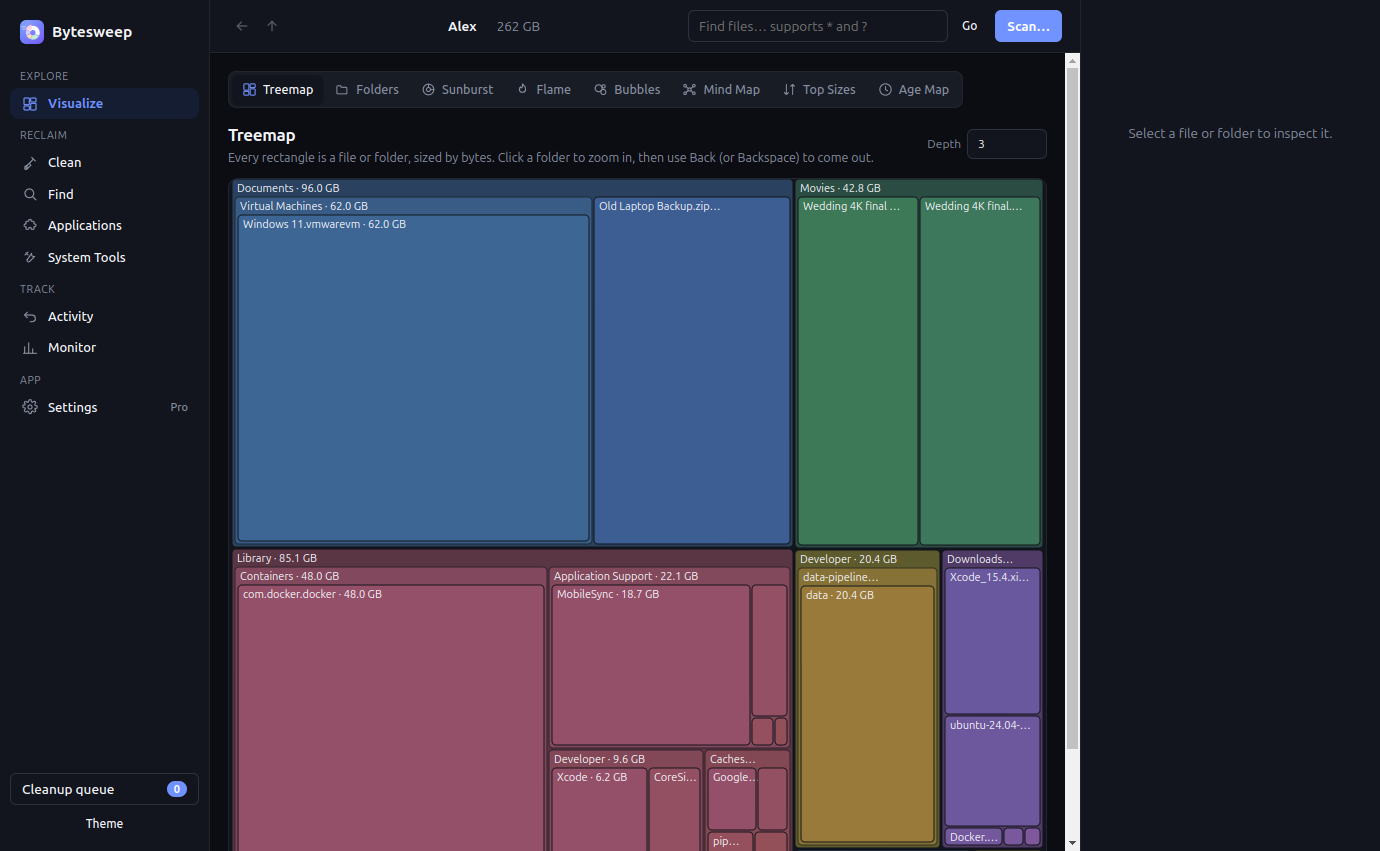
Treemap
Every rectangle is a file or folder, sized by bytes. The big blocks jump out immediately. Click to zoom in.
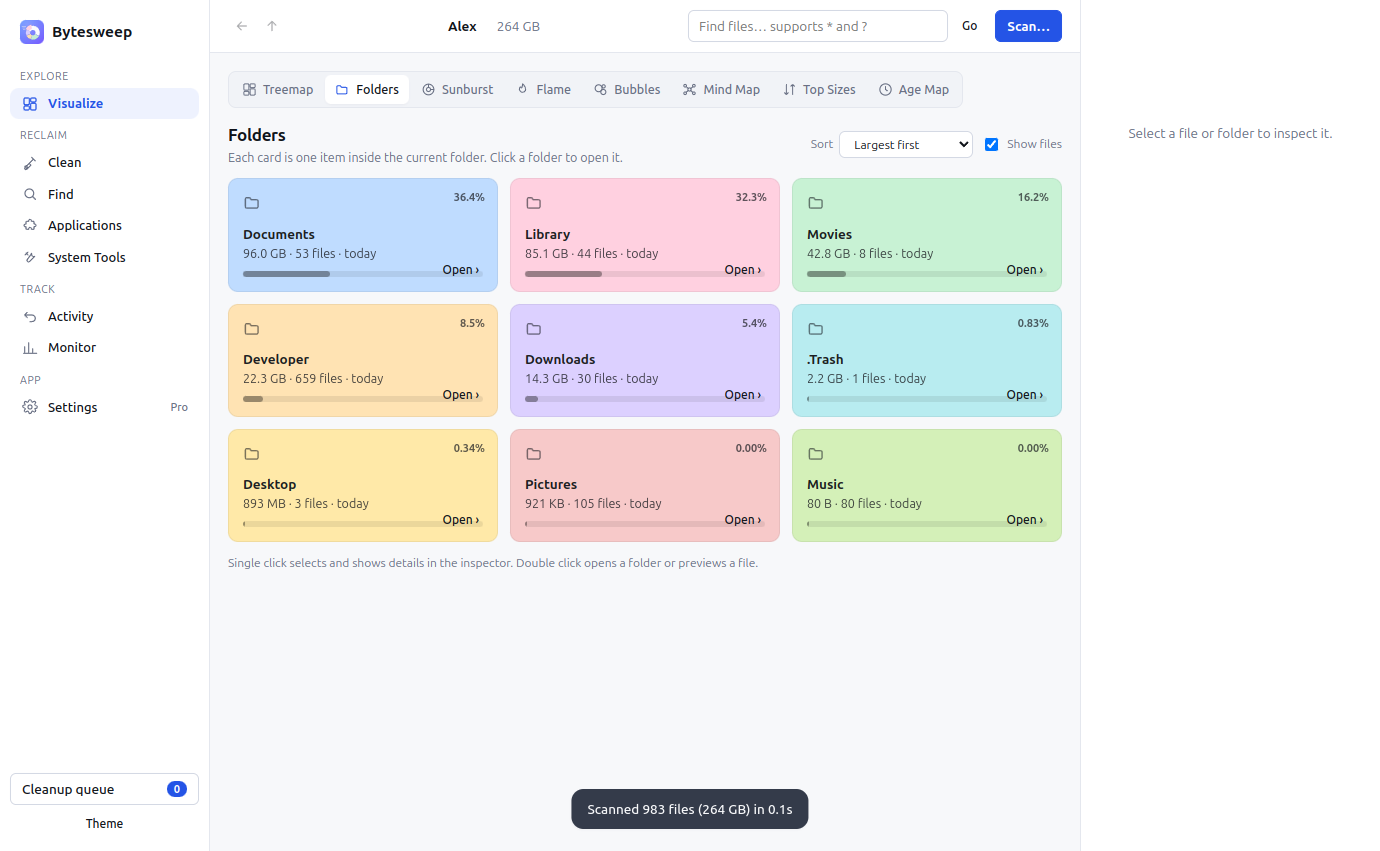
Folders
Pastel cards for every item in the current folder, with size, share and last-modified. Feels like Finder, tells you more.
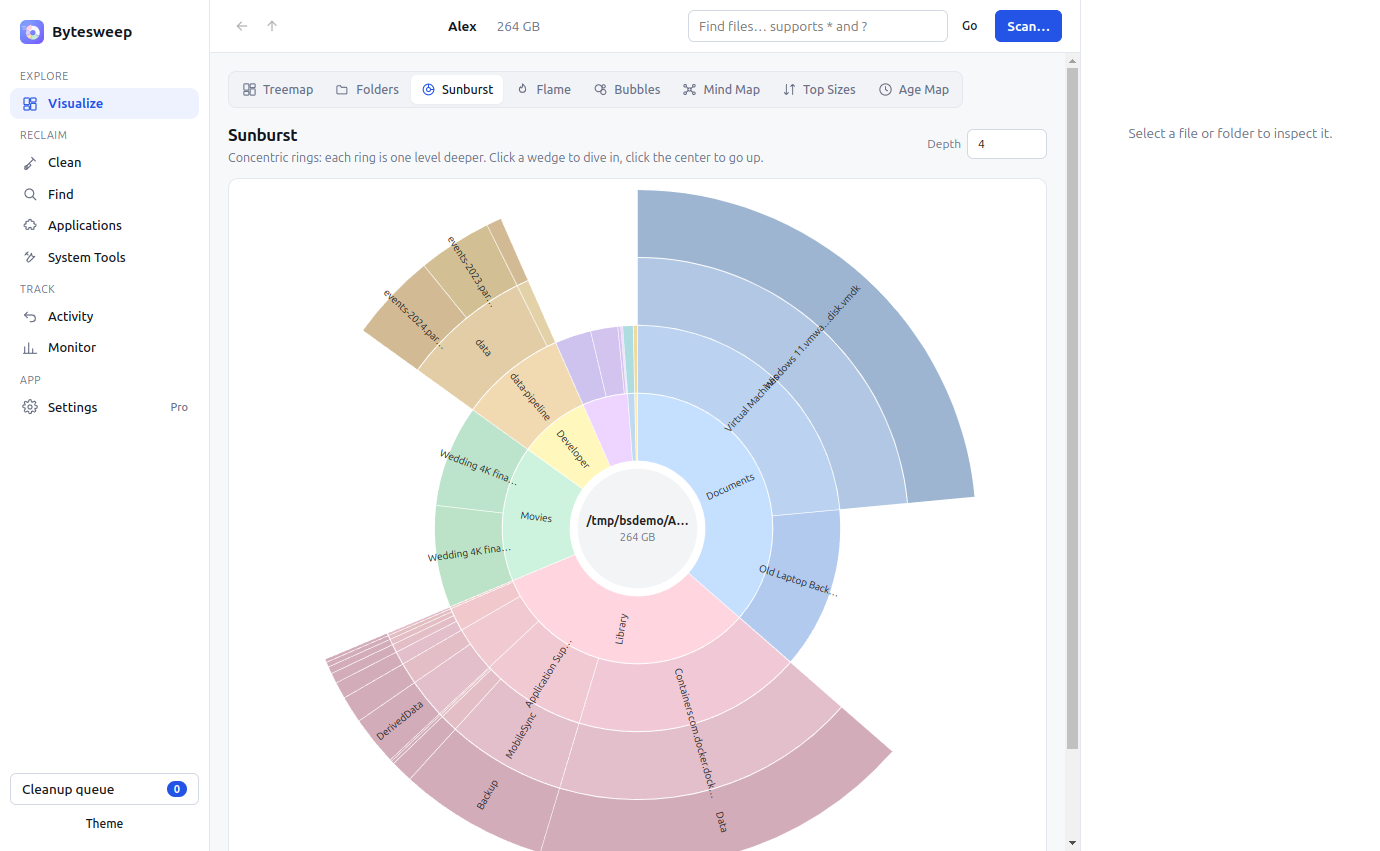
Sunburst
Concentric rings, one per folder level. Click a wedge to dive in, the center to climb out.
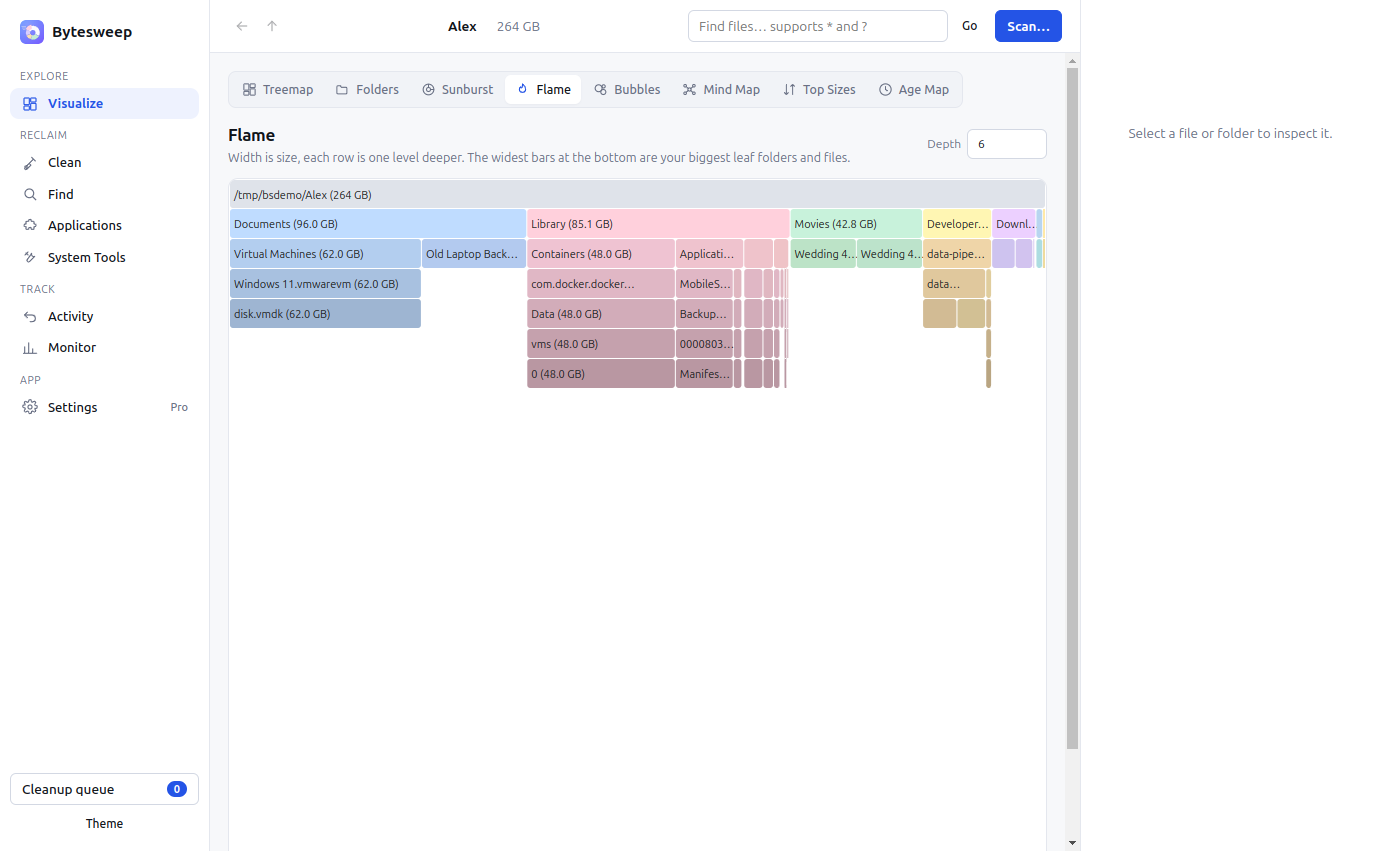
Flame
Width is size, each row is one level deeper. The widest bars at the bottom are your biggest leaves.
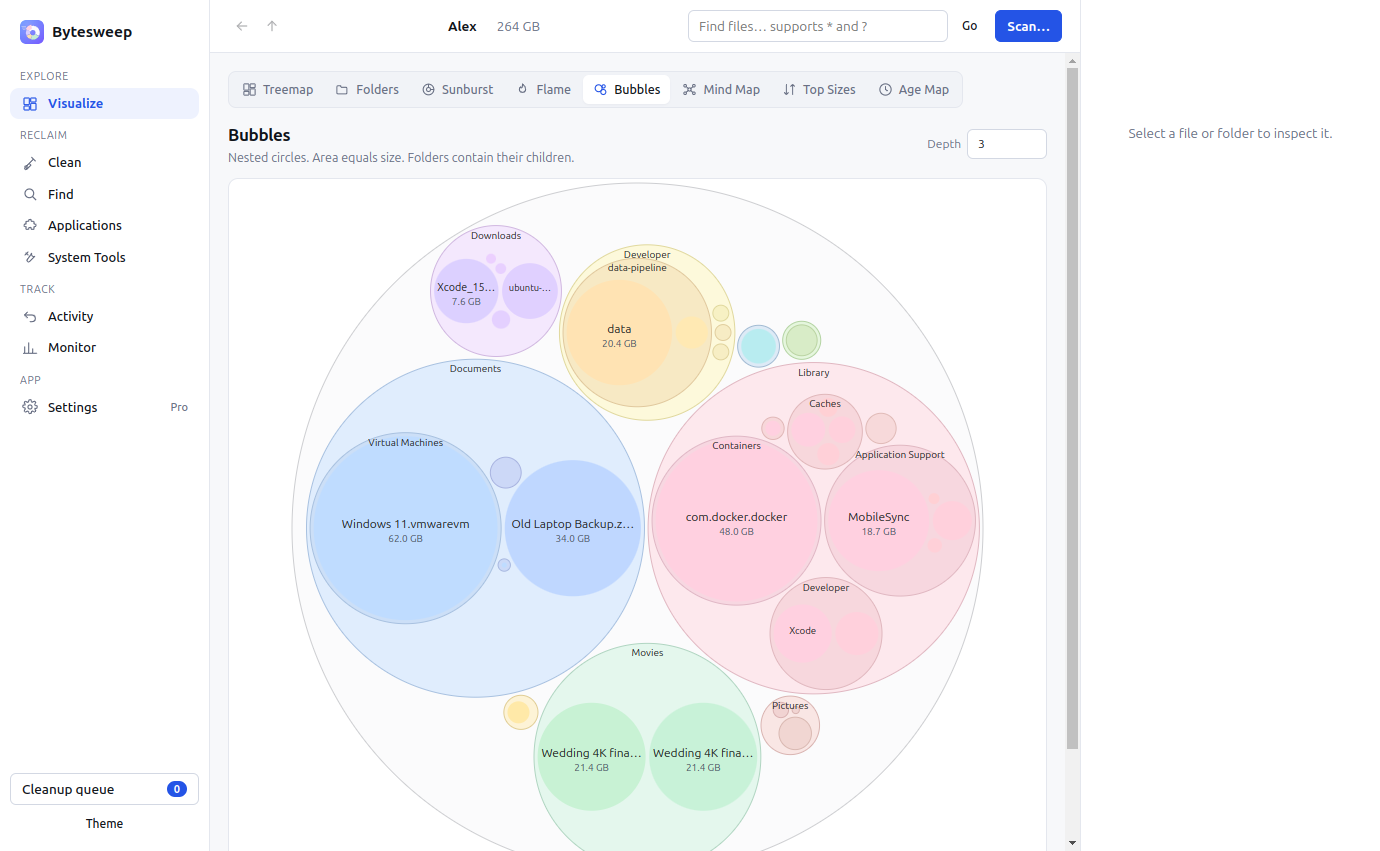
Bubbles
Nested circles where area equals size. Folders contain their children, so nested bloat is obvious.
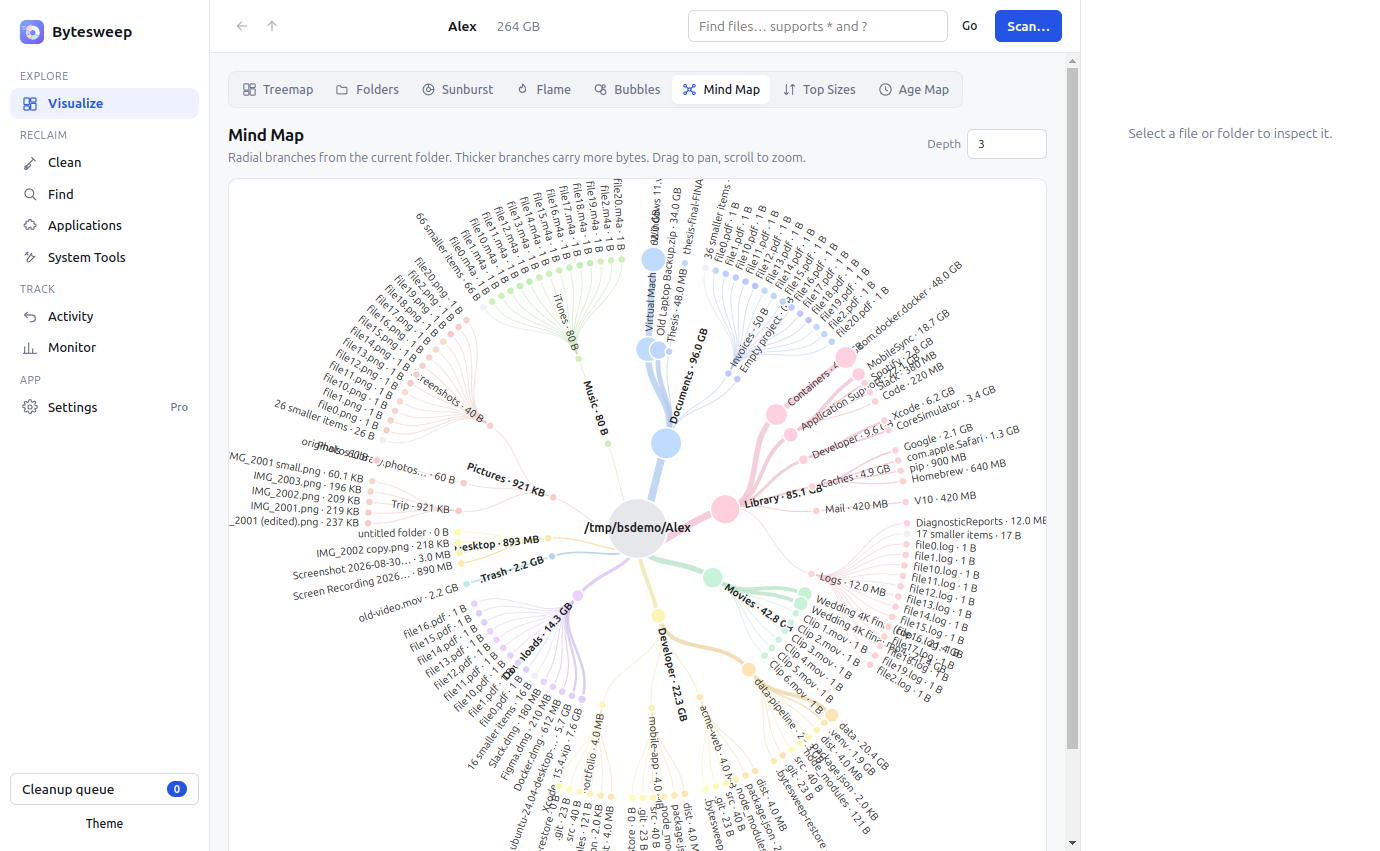
Mind Map
Radial branches from the current folder. Thicker branches carry more bytes. Pan and zoom freely.
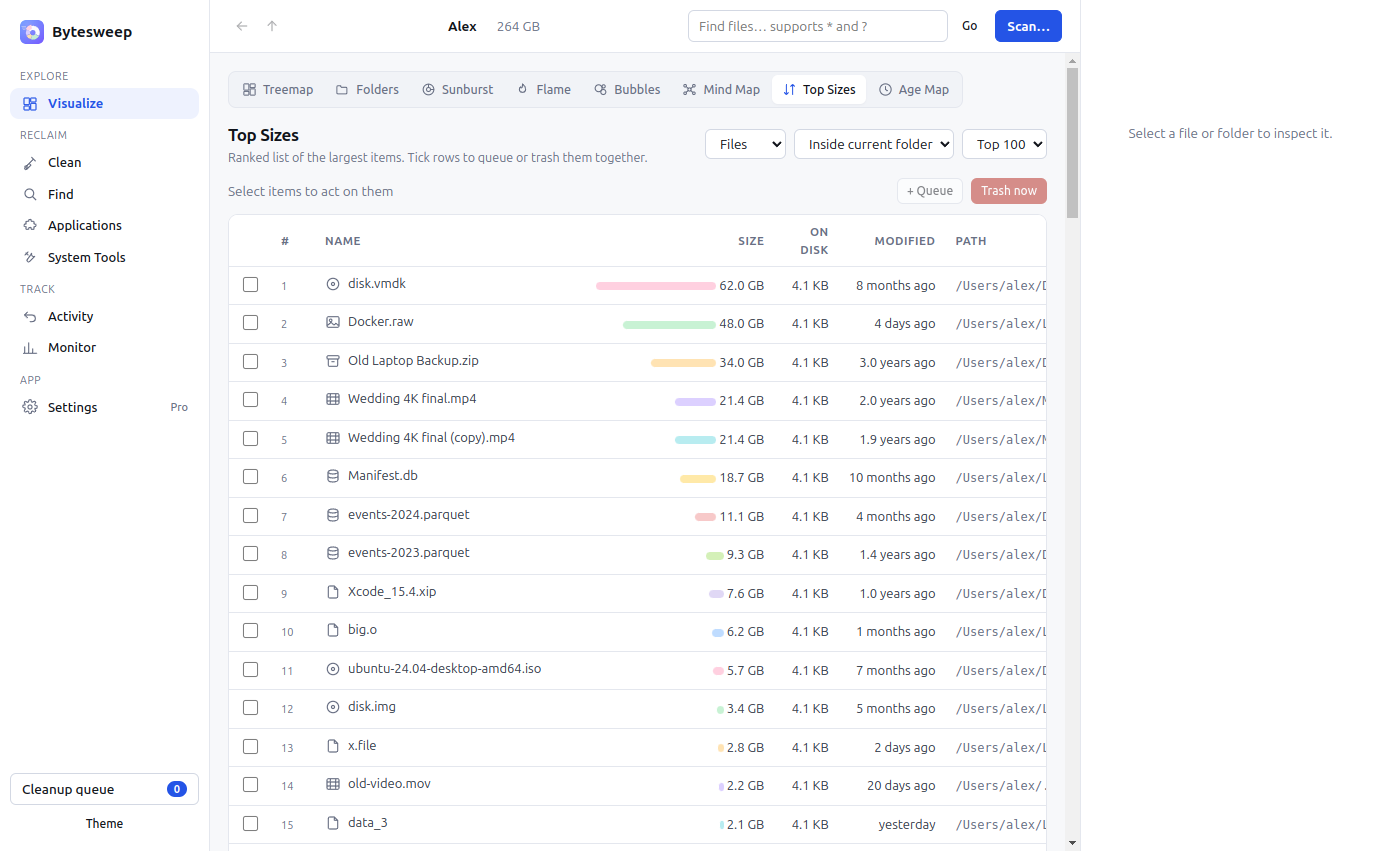
Top Sizes
A ranked list of the largest files or folders, inside the current folder or across the whole scan. Tick and act.
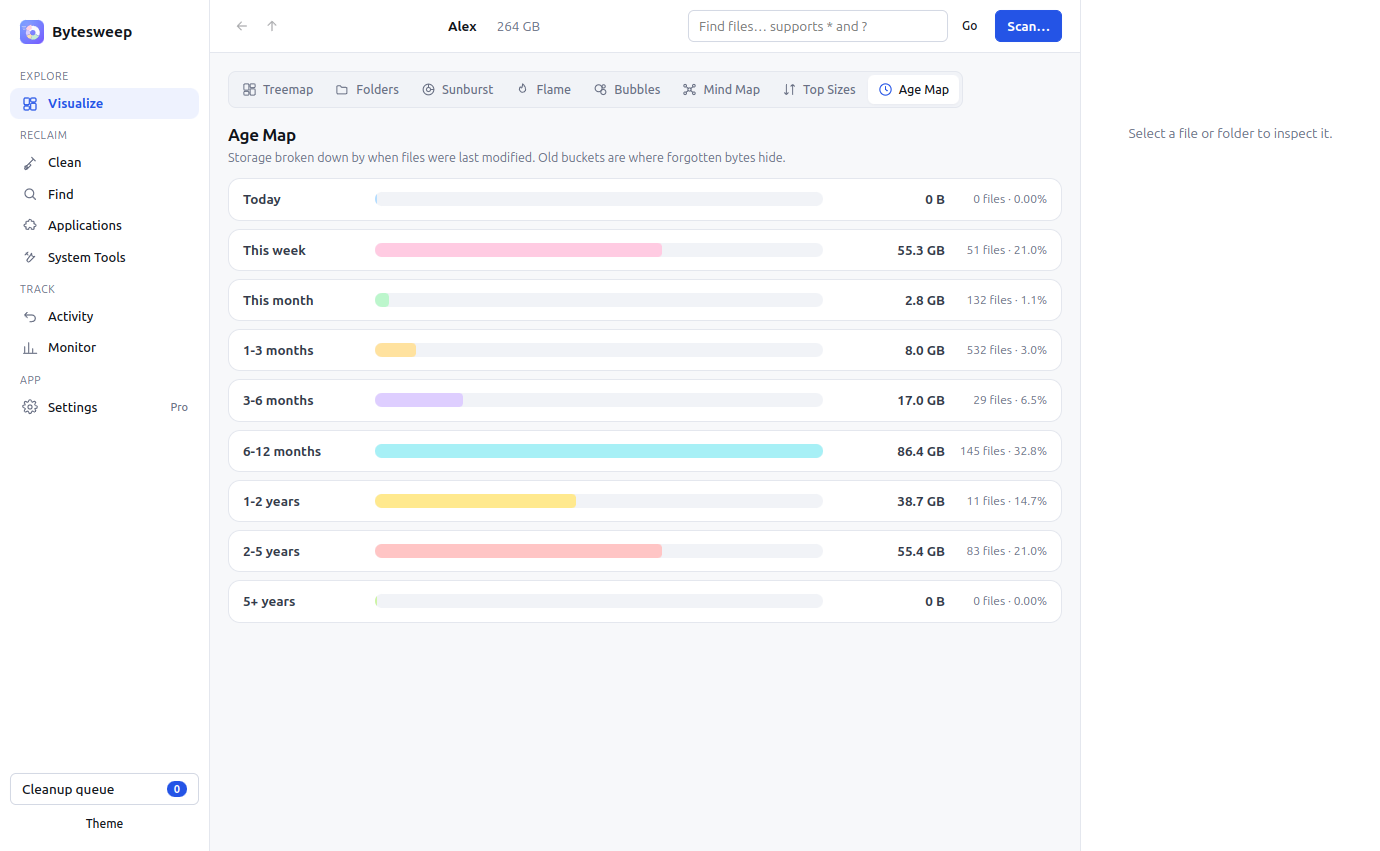
Age Map
Storage bucketed by last-modified date. Old buckets are where forgotten bytes hide; open one to see its largest files.
Everything a storage tool should do, in one place.
Most disk tools stop at a pretty chart. Bytesweep finds the junk, stages it for review, and proves the space came back.
The 60 GB nobody else looks for.
Local models are the fastest-growing thing on a developer's disk and no mainstream cleaner knows they exist. Bytesweep finds Ollama, LM Studio, Hugging Face, torch, GPT4All and Whisper model stores, alongside caches from Cursor, Claude, Copilot, Codeium, Continue and Zed — plus the older problems that never went away: Xcode DerivedData, iOS simulators, Android SDK and AVD images, Docker, node_modules, pip, uv, cargo, go-build, Maven, CocoaPods, Playwright and Puppeteer browsers.
Weights are never filed as disposable. A cache rebuilds in seconds; a 40 GB model is a re-download, and one you fine-tuned yourself is not coming back. Bytesweep marks them for review, not for sweeping.
Four answers, not one.
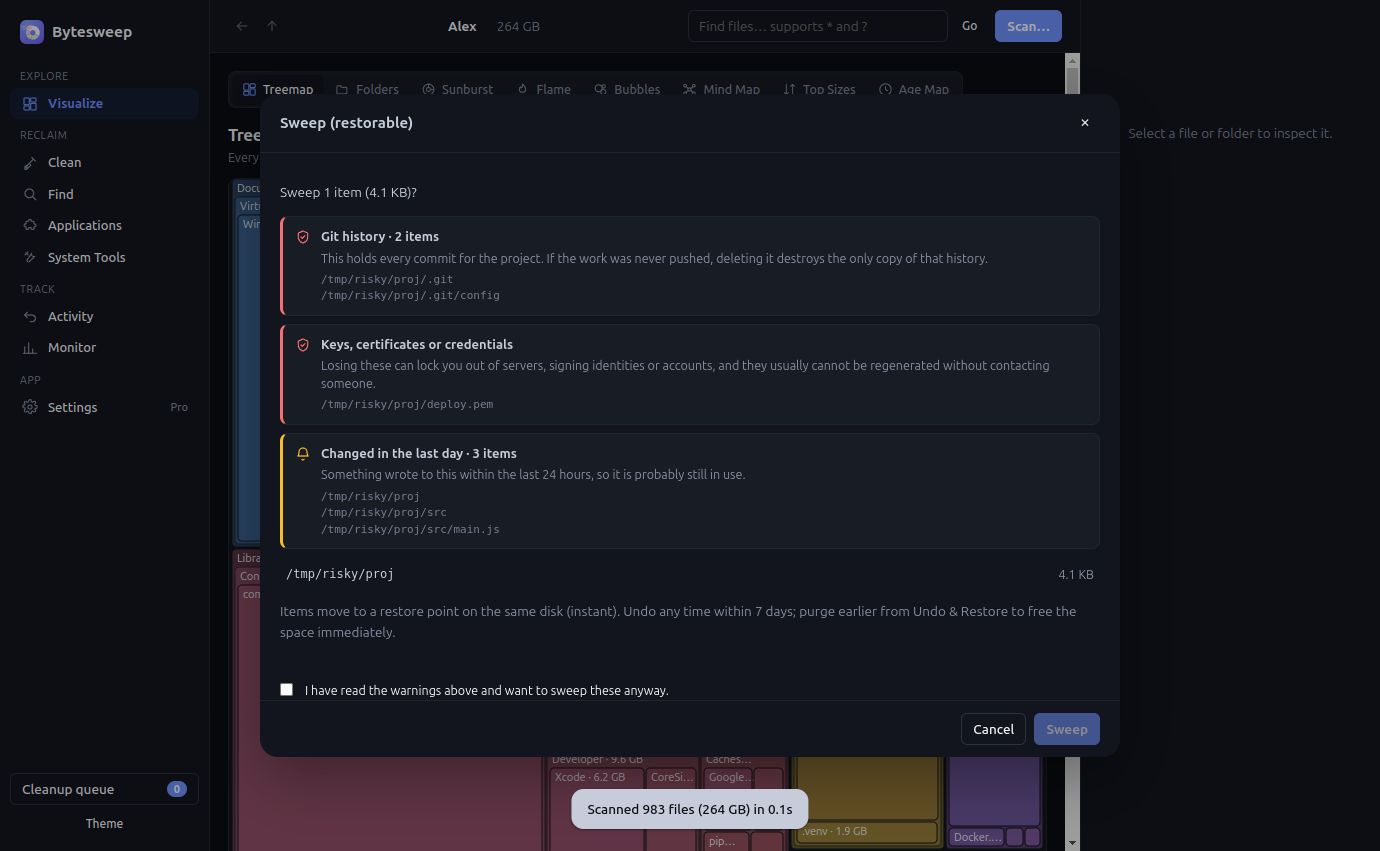
Most cleaners sort files into junk and everything else. Bytesweep sorts them by what happens if you are wrong.
- Refused. The operating system, your home folder, a volume root, and Bytesweep's own restore points. There is no button. Deleting them breaks the machine or throws away every undo you have.
- Irreplaceable. SSH and GPG keys, certificates, cloud credentials, crypto wallets, git history that was never pushed, virtual machine disks, photo libraries, local mail, backups, and databases an app has open right now. Named individually, with the paths that triggered them. The button stays disabled until you say you understand.
- Yours. Documents, Desktop, Pictures, hand-written source, installed applications, anything changed in the last day. Called out by name, one click to continue.
- Rebuilt automatically. Caches and dependency folders. Said out loud, in green, so you stop hesitating over the 30 GB that genuinely does not matter.
A private key inside node_modules is still reported as a private key. Severity always wins over location.
Advice for your disk, not a generic list.
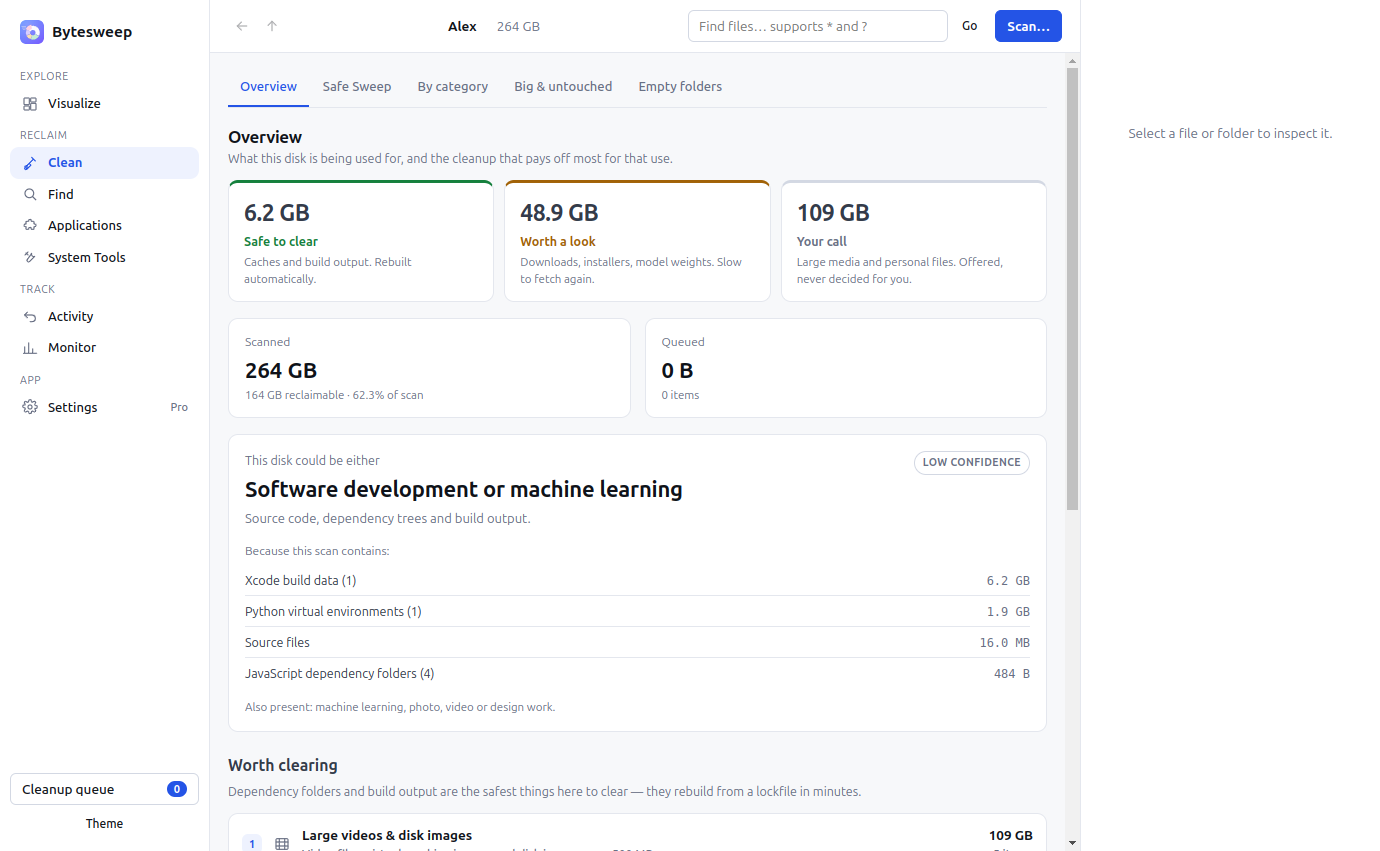
Bytesweep works out how the machine is actually used — development, photo and video work, gaming, office, research, machine learning, a media library — from what is on it, and always shows the evidence behind the guess. The cleanup it recommends is ordered by what will actually pay off here, with the categories typical for your kind of work marked.
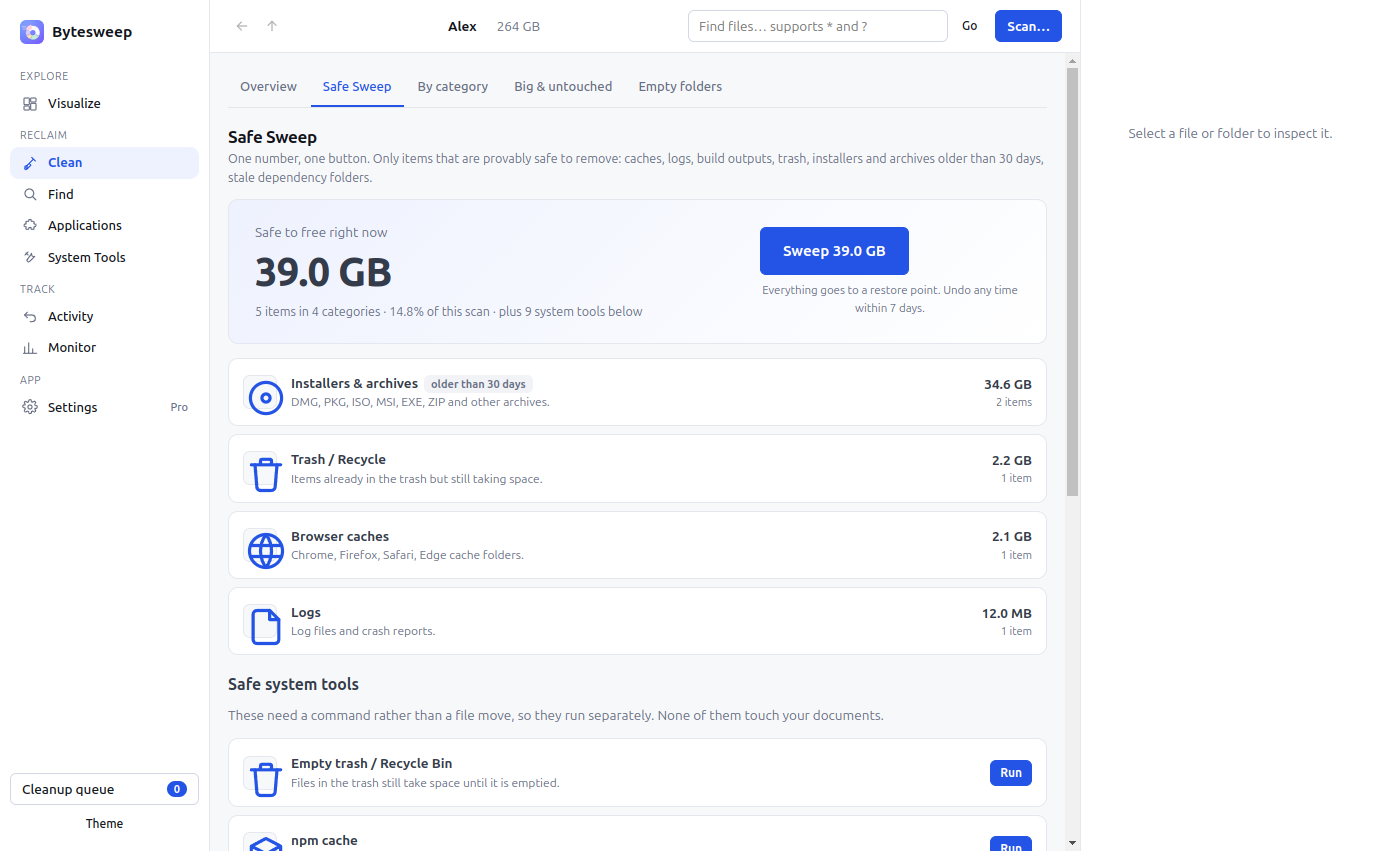
One number. One button.
Only provably safe items: caches, logs, build outputs, trash, installers older than 30 days, dependency folders you have not touched in a month. Everything moves to a restore point first, so Undo is always one click away for 7 days.
Warnings that mean something
Keys, certificates, wallets, git history, VM disks, photo libraries and open databases are named before you delete them. Caches are marked as safe so you stop hesitating over them.
Opens where you left it
Your last scan is kept, so reopening Bytesweep shows results immediately instead of making you scan again. Refreshing reuses everything that has not changed — on half a million files that is about five times faster than a full scan.
Works without a mouse
Every screen is reachable from the keyboard, with visible focus, proper labels and screen-reader support throughout. Reduced-motion settings are respected.
Undo & Restore
Every sweep becomes a restore point on the same disk. Undo any cleanup in one click; it purges itself after 7 days.
Cleanup categories
Caches, logs, node_modules, Xcode, simulators, iPhone backups, Docker, package caches, installers, big videos, screenshots.
Full uninstaller
Quits the app, runs its uninstaller, then removes the bundle, support files, caches and launch agents. Undoable.
Duplicates & similar photos
Byte-for-byte duplicates plus perceptual near-duplicates: burst shots, re-saves, resized exports, HEIC/JPEG pairs.
Developer mode
Every git repo with its node_modules, target, .venv and build folders. Clean stale projects with reinstall hints.
Cloud files
What is really on disk versus online-only in iCloud, OneDrive, Dropbox, Google Drive. Evict to the cloud instead of deleting.
System tools per OS
Time Machine snapshots, journal logs, snap and flatpak leftovers, Docker prune, with the OS admin prompt.
Weekly reports
Scheduled background scans tell you what grew this week and what is reclaimable. PDF and HTML reports to share.
All your machines
Three computers per license. Sync summaries through any shared folder and see every machine's free space in one table.
Snapshots & forecast
Save a scan, compare later folder by folder, and see how many days until the disk is full at the current rate.
Live monitor
CPU, memory, network, volumes, top processes and SMART disk health. Free space updates as you clean.
Alerts in the tray
Low disk space and large-file alerts from the menu bar or system tray, before it becomes a problem.
Built for Mac first. Your other machines are covered too.
One licence covers three computers in any mix, so the Linux box gets the same treatment as the Mac.
- "System Data" mysteryTime Machine local snapshots and purgeable space, thinned so free space is really free.
- Xcode & simulatorsDerivedData, device support, unavailable simulators. Often 20 to 60 GB.
- iPhone backupsOld device backups in MobileSync, found and dated.
- App leftoversSupport files, caches, containers and launch agents, matched to the app.
- Homebrew, Docker.raw, MailCaches, container disks and attachments that Finder never shows.
- Package cachesapt, dnf, pacman, zypper caches and orphaned packages, including old kernels.
- Journal logs & core dumpsjournalctl vacuum and /var/crash in one click.
- Snap & Flatpak leftoversDisabled snap revisions and unused runtimes.
- ~/.cache and dev junkThumbnails, pip, npm, cargo, go and gradle caches.
- DockerUnused images, containers and build cache.
It runs offline. That is the whole design.
Disk tools ask for extraordinary access. Here is exactly what Bytesweep does with it, in terms you can verify by pulling the network cable.
Nothing about your files leaves the device
No accounts, no sign-in, no analytics, no telemetry, no crash reporting. File names, paths and folder listings are never transmitted. Scan results, snapshots and reports are written to your disk and nowhere else.
One network call, and you can see it
Licence activation and a periodic validity check against the payment provider's licence API. It sends the key and a device name. Nothing else in the application makes a network request, and everything except activation works with no connection at all.
Reversible by design
Sweeps move items to a restore point on the same volume rather than deleting them, so recovery is a rename, not a backup restore. Undo is available for seven days. Permanent deletion always requires explicit confirmation.
Least privilege
The application is not sandboxed, because scanning a whole disk requires it, and it is signed with a Developer ID and notarized by Apple. Administrator rights are requested only for the specific maintenance task that needs them, through the operating system's own prompt, and are never stored.
Perpetual licence, no lock-in
One payment, three machines, no subscription and no renewal. The application keeps working if this business disappears; a licence check that cannot reach the server falls back to a fourteen-day offline grace period. Volume licensing is available on request.
Auditable behaviour
Every maintenance action states the exact command it will run before you approve it, and shows the output afterwards. Nothing is hidden behind a progress bar. Read the privacy policy or the terms.
One price. No subscription.
Try everything for 14 days. Then one payment unlocks Bytesweep for good, on up to three of your machines. CleanMyMac costs about $120 over three years. This is $15, once.
- Unlimited sweeping (trial: 10 items a day)
- Safe Sweep, Undo & Restore, permanent delete
- Full uninstaller, Similar Photos, Projects, Cloud Files
- System Tools, scheduled Reports, PDF export, cross-machine sync
- 3 computers, any mix of macOS and Linux
- Every 1.x update free · 14-day money-back guarantee
The 14-day trial includes: all eight views, the inspector, cleanup categories, duplicates, file types, empty folders, the live monitor, snapshots and 10 manual sweeps a day. Pro features are marked in the app.
Secure checkout by Dodo Payments. Your license key is shown right after payment and emailed to you.
How buying works
- Click BuyYou go to a secure Dodo Payments checkout page. Pay by card, Apple Pay, Google Pay, UPI or PayPal in your local currency. Tax is handled for you.
- Get your license keyYour key appears on the confirmation page immediately and is emailed to you. Keep the email; it is your receipt.
- Download BytesweepGrab the installer for your OS below, or keep the trial you already have. It is the same app; the key unlocks it for good.
- ActivateOpen Bytesweep, go to License, paste the key, click Activate. Use it on up to three computers; deactivate one to move it.
Not happy? Reply to the receipt email within 14 days for a full refund. See the refund policy.
Try it free for 14 days.
No card, no account. Install it, look around your disk, and buy a key when you are convinced. The key unlocks the same app on all three platforms.
Version 1.0.0 · ~110 MB · No installer tricks, no bundled extras.
Questions, answered.
What do I get during the trial, and what needs Pro?
The 14-day trial covers scanning, all eight views, the inspector, cleanup categories, duplicates, file types, empty folders, snapshots, the live monitor and up to 10 manual sweeps a day. Pro removes the daily limit and adds Safe Sweep, Undo & Restore, permanent delete, the full uninstaller, Similar Photos, Projects, Cloud Files, System Tools, scheduled Reports, PDF export and cross-machine sync. After 14 days a licence key is needed to keep using the app.
What happens to my key if I get a refund?
The key is terminated the moment the refund is issued. The app checks in daily and locks itself automatically; nothing on your disk is touched.
Is it safe? Can Bytesweep delete something important?
Bytesweep never deletes on a click. Safe Sweep only touches caches, logs, build outputs and similar. Everything you sweep goes to a restore point on the same disk first, and Undo puts it back in one click. Restore points are kept for 7 days (you can change that) and then purged. Permanent delete always asks twice.
Does it work on external drives and network shares?
Yes. Pick any mounted volume or folder. External drives, USB sticks, NAS shares and Time Machine disks all scan the same way.
How fast is it?
A 118 GB home folder with 2 million files scans in about 10 seconds on an Apple silicon Mac. Linux is similar on SSDs. The scan runs in a worker thread, so the app stays responsive.
What is the difference between logical size and size on disk?
Logical size is what the file contains. Size on disk is what it actually occupies, which is smaller for compressed files on APFS or NTFS, and zero for online-only cloud files. Bytesweep shows both so the numbers add up.
How many computers can I use it on?
Three at a time, any mix of macOS and Linux. Deactivate a machine from the License screen to free a slot.
Do I need an account?
No. You get a license key by email. Paste it into the app. That is the only thing that ever talks to a server.
Will future updates cost money?
Every 1.x update is free. If there is ever a 2.0 with major new features, existing customers get a discount.
Can I get a refund?
Yes, within 14 days, no questions asked. Reply to your receipt email or write to support.